Note /
Shrimp pond conversion vs mangrove loss: telling them apart in satellite imagery
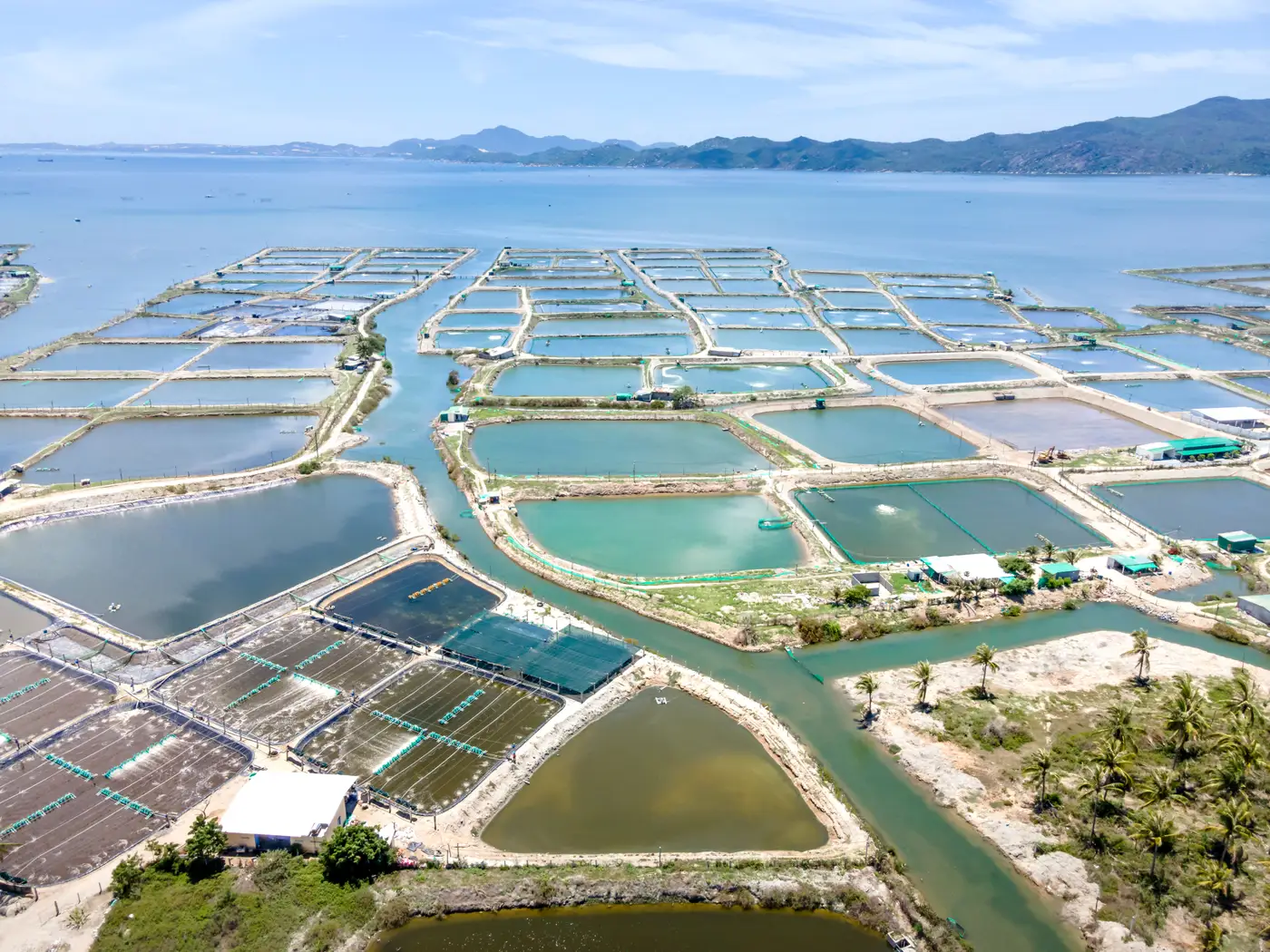
You're looking at two scenes of the same stretch of coast, a year apart, and a chunk of canopy that was there last year is gone. Before that gap goes in your extent report as a loss polygon, you need to know what caused it, because "mangrove loss" covers a few very different things in a registry's eyes: conversion to aquaculture, storm damage, salinity-driven dieback, erosion. Call it the wrong one and you've misstated your project's loss driver, which matters when a verifier asks why your buffer deduction or your baseline recalculation looks the way it does.
Here's how to tell shrimp pond conversion apart from natural mangrove loss when you're staring at a multispectral composite.
Shape gives it away before spectral does
Ponds are built. That means geometry: straight dike walls, right angles, rectangular or square cells often arranged in a grid, with a feeder canal running to the nearest tidal creek. Even a single pond under construction shows up as a hard-edged polygon against the organic, scalloped boundary of a healthy mangrove fringe.
Natural loss doesn't draw straight lines. Erosion eats the seaward edge in a smooth, curved retreat that follows the hydrodynamics of the coast, not a lease boundary. Dieback from blocked tidal flow or a salinity spike shows up as blotchy, patchy canopy loss scattered inside the stand, not along its edge, often starting around the driest or most hypersaline microsites first.
What the bands tell you at each stage
Right after a pond is cut, you'll see bare, excavated soil: high reflectance in the visible bands, spoil piles along the new dike lines, none of the moisture signature you'd expect from an intact mangrove floor. Within a season or two, that excavated cell fills with water, and aquaculture water has its own look. It often reads turbid or green from feed and algae, a flat, even signal that sits apart from the mixed sediment-and-tide pattern of a natural creek or mudflat. NIR drops out hard over that water, which is useful for confirming a pond has actually been flooded and isn't just cleared ground waiting on a tenant.
Dieback reads differently through time. First you get standing dead stems, a grey, skeletal canopy that still has structure from above (people in the field call it a ghost forest for a reason). That stage can last a year or more before the stems fall and the plot converts to bare mudflat. If your "loss" polygon still shows standing structure in the first post-loss image, you're probably not looking at clearing.
Check the footprint against what else is happening nearby
A pond doesn't appear alone. Look for an access road feeding the new cell, a cluster of existing ponds nearby, a canal network that predates the clearing. Conversion is almost always bounded to a single compound or a lease area, and the grid pattern often appears before any water does, while it's still under construction.
Dieback tends to be regional. If canopy loss is showing up as patches spread across a wider area in the same season, not just inside your project boundary, that points to a shared stressor: a drought year, an upstream dam closing off freshwater input, a cyclone track. Cross-reference the date of loss against any known storm or drought event for that reporting year before you write "anthropogenic clearing" into the report.
Doing this scene by scene, squinting at whatever cloud-free composite you could find for that year, is how a loss polygon gets mislabeled. Mangrove Monitor delivers a dated annual extent layer, with loss and regrowth already split into separate polygons, sourced from the same high-resolution multispectral imagery you'd be pulling apart by hand, so the geometry and timing checks above are mostly done before you open the file.
If your next extent update needs that distinction made cleanly, that's exactly the gap Mangrove Monitor is built to close.